


Maintaining Kia Smart Key Systems & Emergency Mechanical Door Access
Key Takeaways
- Smart keys depend on a small battery: A weak coin cell is the most common reason a fob stops locking, unlocking, or starting the vehicle, and cold Ohio mornings make it worse.
- Every smart key hides a mechanical backup: A physical key stored inside the fob can open the driver door even when electronics fail.
- You can usually start the car with a dead fob: Holding the fob against the Start/Stop button lets the vehicle read it without battery power in most models.
- The car’s 12-volt battery matters too: A weak vehicle battery can mimic a dead fob, so symptoms are worth diagnosing before replacing anything.
Few things ruin a morning in Huber Heights like standing in a cold parking lot while a Kia refuses to recognize its own key. A coin cell battery costs a few dollars and a quick check of the emergency access steps costs nothing, while a lockout, a tow, or a rushed replacement fob can cost far more in money and time. Here is how Dayton area drivers can keep their smart key systems healthy and what to do when the technology fails.
How a Kia Smart Key Actually Works
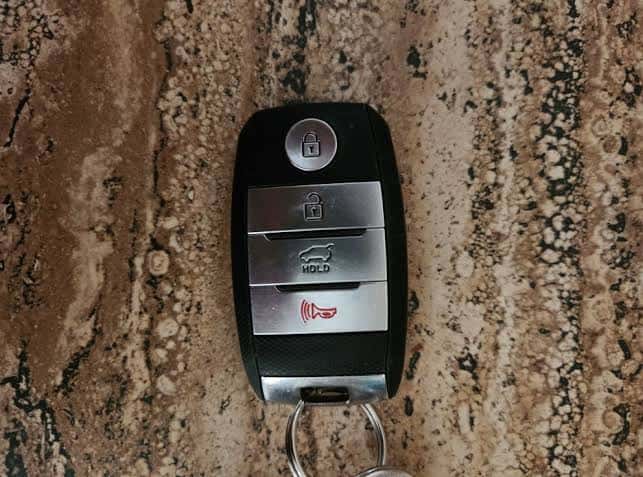
A smart key system lets you unlock the doors, open the trunk or liftgate, and start the engine without ever taking the fob out of your pocket or purse. The vehicle sends a low-power signal through antennas placed around the cabin and exterior. When a valid fob is within range, it responds with an encrypted code, and the vehicle confirms the match.
That exchange happens in a fraction of a second. When you touch the door handle sensor or press the button on the handle, the system checks for a nearby fob before releasing the lock. Inside the cabin, it looks for the fob again before it allows the Start/Stop button to turn on the engine or electric system.
Because the fob must send a signal back, it needs power. Most Kia fobs use a small coin cell battery, and many use a CR2032 type, although the size varies by model and year. Your owner’s manual identifies the correct battery for your vehicle, and the right replacement matters because a poor fit can cause intermittent contact.
Common Reasons a Smart Key Stops Working
A fob that stops responding is not always a failed fob. Several everyday causes show up again and again.
The most frequent is a weak battery. As voltage drops, the fob’s signal range shrinks, so you may need to stand right at the car for it to respond. Many Kia models also display a low key battery message on the dash before the fob fails completely, which is worth taking seriously.
Cold weather can reduce a coin cell’s output, so a fob that works fine in the afternoon may struggle on a freezing morning at Old Troy Pike. Moisture is another culprit, since water or condensation inside the fob can corrode contacts and short out the circuit board. Physical damage from drops, pocket wear, or a key ring crowded with metal objects can also take a toll.
Interference can play a role as well. Strong radio sources, nearby electronics, and metal cases can block or weaken the signal in some situations. And occasionally the problem is not the fob at all, but a low 12-volt battery in the vehicle, which can cause weak or erratic behavior from the entire system.
Smart Habits That Extend Key Life
A few simple routines help your fob last and keep the system reliable. Genuine batteries, replacement keys, and related components are available through the Kia of Dayton parts center, which helps ensure the right fit for your model.
- Replace the battery proactively: Many owners change the coin cell every couple of years, or sooner as soon as a low battery message appears.
- Keep a spare key available: A second fob stored safely at home can save you from a lockout or a no-start situation.
- Protect the fob from water and drops: A silicone cover helps cushion impacts, and drying a damp fob right away reduces corrosion.
- Store the fob away from the vehicle at home: Keeping it a distance from the car, and away from windows and doors, helps avoid unwanted signals and unintended unlocking.
- Avoid overloading the key ring: Heavy keychains add stress to the fob and can wear the casing and buttons over time.
How to Replace the Fob Battery
Replacing a smart key battery is usually a quick job. Start by locating the release latch on the fob and sliding out the hidden mechanical key. Many Kia fobs then open by inserting the mechanical key or a small flat tool into a slot along the seam and gently twisting to separate the halves.
Note which direction the old battery faces before removing it, since the positive side placement matters. Install the new coin cell in the same orientation, avoid touching the flat surfaces with bare fingers if you can, and snap the halves back together firmly. Test the lock, unlock, and start functions afterward.
Your owner’s manual shows the exact steps for your key design, and the service team is glad to help if the case feels tight or you want to avoid scratching it. If the fob still does not work after a fresh battery, the problem may involve the circuit board, a damaged antenna, or the vehicle itself, and an inspection can identify which.
Getting Into Your Kia With the Mechanical Key
When the fob will not unlock the doors, the mechanical key is your backup. It is designed for exactly this situation, and knowing how to use it ahead of time makes a stressful moment far easier.
Slide the release latch on the fob and remove the key blade. On the driver door, look closely at the handle. In many Kia vehicles, the keyhole is hidden beneath a small cover on the underside or end of the handle. Use the key blade to gently pry the cap off, insert the key into the cylinder behind it, and turn it to unlock the door. Many models only offer the keyhole on the driver door, so the remaining doors are unlocked using the interior controls.
Be aware that opening a door with the mechanical key may trigger the alarm on some vehicles. The alarm usually stops once you start the vehicle or press a button on a working fob, and your owner’s manual explains the process for your model. Practice the steps once in your driveway so they feel familiar.
Starting the Vehicle With a Dead Fob
Even with a completely dead fob battery, most Kia models allow a backup start. The vehicle reads the fob through a short-range inductive connection that does not depend on the fob’s battery.
With the fob in hand, press the brake pedal and then touch the fob directly against the Start/Stop button. On many models, the lock button side of the fob is the part that should contact the button. Some vehicles also have a small pocket or marked area elsewhere in the cabin for this purpose, so confirm the right location in your owner’s manual. With the fob positioned correctly, press the Start/Stop button with the fob itself while holding the brake, and the engine or electric system should start.
If the vehicle starts this way, the fob battery is almost certainly the problem, and you can replace it soon. If the vehicle does not respond at all, the vehicle’s 12-volt battery or another system may be at fault.
When the Problem Is the Vehicle, Not the Key
A weak 12-volt battery can look a lot like a failed fob. Symptoms include dim interior lights, slow or absent door lock response, a clicking sound when you try to start, and warning messages that appear and vanish. Cold weather makes this scenario common in Southwest Ohio winters.
Smart key systems also depend on healthy vehicle electronics, including body control modules, antennas, and door handle sensors. A damaged handle sensor, a failed antenna, or a software issue can prevent a perfectly good fob from working. A technician can scan the vehicle for stored codes and test each component rather than guessing.
If you ever need to jump-start your Kia, follow the instructions in your owner’s manual closely, because modern vehicles can be sensitive to improper connections. For electric and hybrid models, the 12-volt battery still powers the systems that wake up the vehicle, so it deserves the same attention.
Replacement Keys, Programming, and Staying Prepared
If a fob is lost, damaged, or beyond repair, a replacement must be programmed to your vehicle. The process typically requires proof of ownership and identification, along with any existing keys, and it is best handled by a dealership service department with the correct equipment. Having a spare programmed before you lose your only key is usually far simpler and less stressful.
You can review what your vehicle is due for through the Kia of Dayton service center, and the team can also check your battery, key system, and related electronics during routine visits.
Before winter trips along I-70 or I-75, check current conditions on OHGO, Ohio’s traveler information resource, so you can avoid closures and long delays. It is also worth confirming there are no open safety recalls or service campaigns on your Kia by entering your VIN in the NHTSA recall lookup, which takes about a minute.
The Cost of Prevention Versus Repair
The gap between preparing for a smart key problem and reacting to one can be significant. The ranges below are general and approximate, and they vary by model, year, and the work required. Always request a written estimate for your specific Kia.
- Fob battery replacement: Typically a very small cost for the battery itself, and a quick service if you prefer help.
- Key system diagnosis: Usually a modest charge that identifies whether the fob, the vehicle, or the 12-volt battery is the cause.
- 12-volt battery replacement: Commonly a modest to moderate expense, and a frequent hidden cause of no-start complaints.
- Replacement smart key with programming: Often a few hundred dollars or more, depending on the model and key type.
- Lockout, towing, and lost time: An unexpected failure away from home adds expense and inconvenience beyond the repair itself.
Seen side by side, a few dollars and a few minutes of attention now can prevent a much larger hassle later.
Keep Your Kia Key Ready for Every Morning
A smart key is one of the most convenient features on a modern Kia, and it stays reliable with a little care. Replace the battery before it fails, learn where the mechanical key and backup start location are, keep a spare handy, and pay attention to the vehicle’s 12-volt battery as well.
If your fob has become unreliable, you have seen a low key battery message, or you need a spare programmed, the team at Kia of Dayton, located at 8560 Old Troy Pike, Huber Heights, OH 45424, United States, can diagnose the issue and recommend the right solution. You can schedule service online at a time that works for you and make sure every start and every unlock goes smoothly.
0 comment(s) so far on Maintaining Kia Smart Key Systems & Emergency Mechanical Door Access